Count a service
Record how many adults, youth and children came, and how many were new.
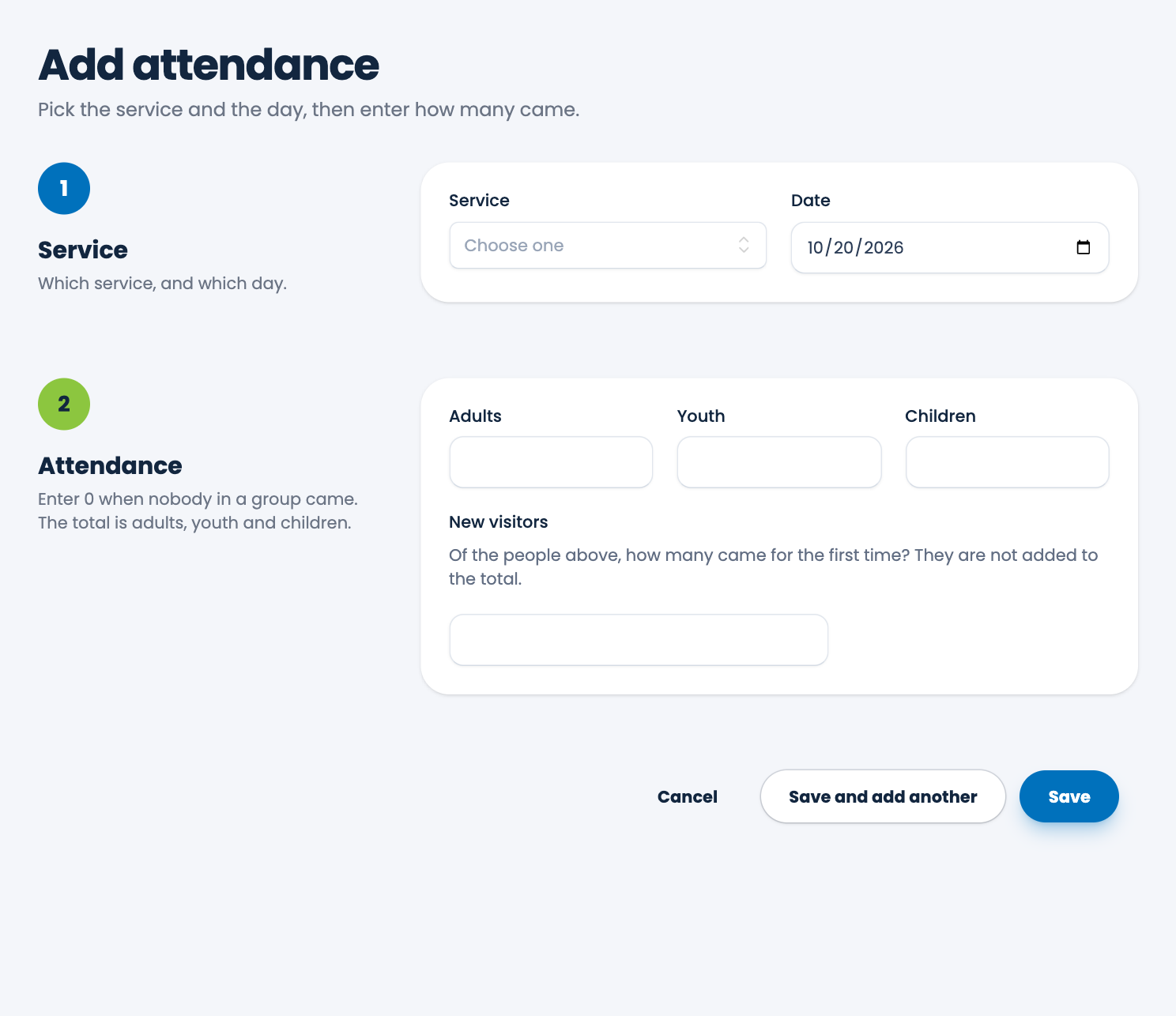
Attendance is counted one service on one day at a time: how many Adults, Youth and Children came, and how many of them were there for the first time.
Steps
- Choose Attendance in the menu, then Add attendance.
- Under Service, choose which service, and the Date. The date starts as today.
- Under Attendance, enter the number of Adults, Youth and Children. Enter 0 when nobody in a group came. The total is worked out for you.
- Enter New visitors: of the people you've just counted, how many came for the first time. They are already included in the groups, so they aren't added to the total again.
- Choose Save, or Save and add another to enter another service or day.
Rules
- A service can have only one count a day. To change a day's count, edit it. See Edit or delete a count.
- Every number must be a whole number, and not negative. You must enter all four, even if some are 0.
- New visitors can't be more than the total.
- The date can't be in the future, and can't be before the year 2000.
Why count?
Your counts feed the dashboard's attendance cards and charts, the attendance report, and the service report. See Trends.
Tip. If you have no services yet, the form tells you to add one in Settings first. See Service types.
Spotted a mistake, or something that is not clear? Tell us.