Deposit slip
Fill in a bank deposit slip with the cash and each check from a service.
Note. This is for Administrators and Managers. If you're in Member care, you won't see it in your menu. See Roles and what they can do.
The deposit slip adds up the cash and lists each check from a service, or from a group of services such as both Sunday services, ready to take to the bank.
Careful. The slip is a convenience, not a bank form. Banks differ in what they accept, and some only read the numbers along the bottom when they're printed in magnetic ink. Check with your bank before you rely on it.
Before you start
Enter your routing number once under Settings, then Bank. See Bank routing number.
Steps
- Choose Reports, then Deposit slip.
- Choose the Service, which can be one service or a group of services, and the Service date.
- Change the Date on the slip if you aren't going to the bank today.
- If you're keeping some cash back, type it under Cash received back. It's optional.
- Type your Account number. It is typed each time and never saved.
- Look over the slip shown below. Cash is added up, the checks are totaled, and the total deposit is worked out.
- Choose Print deposit slip.
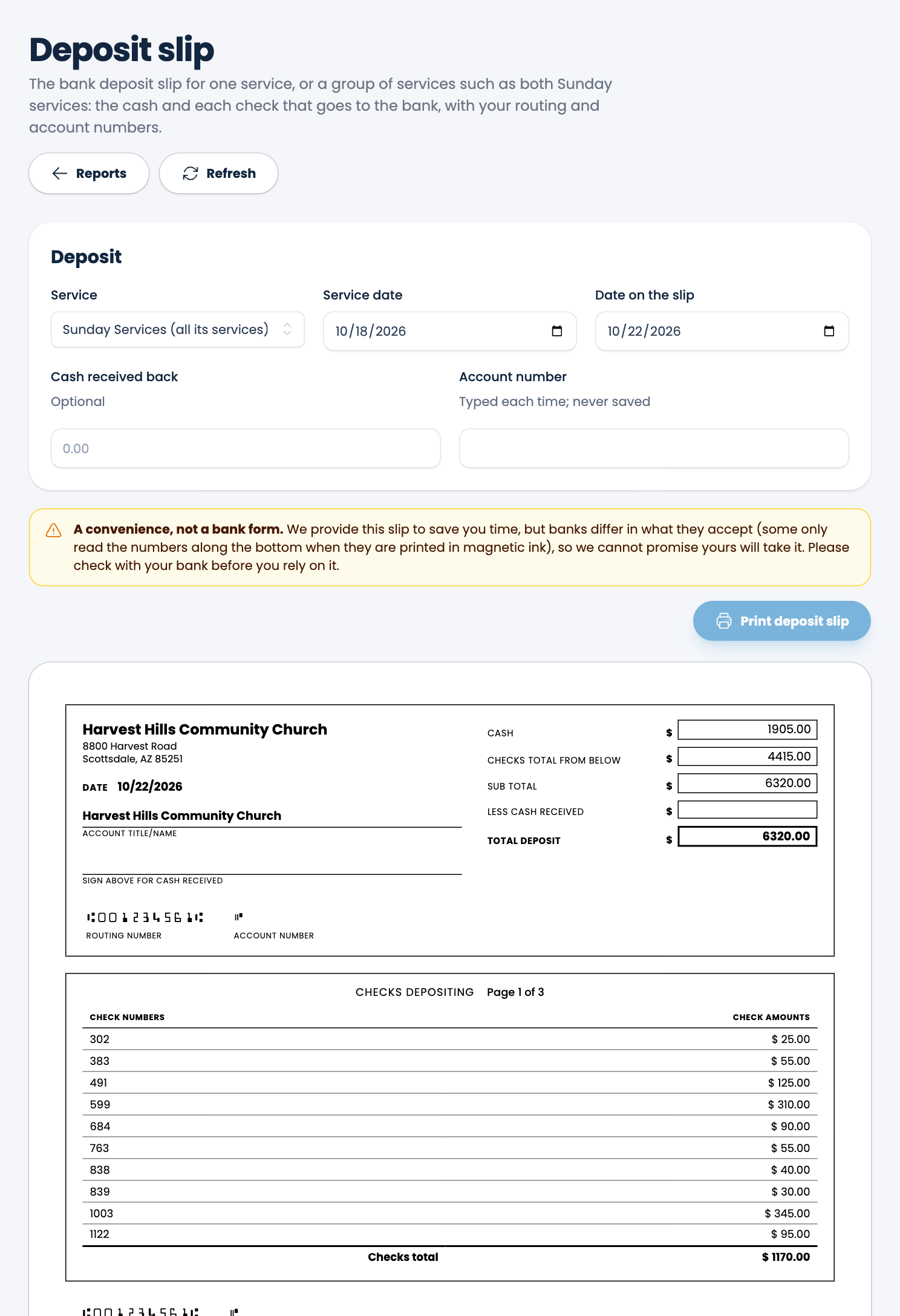
If there are more checks than fit on one page, they continue on more pages, each numbered and with its own total.
Spotted a mistake, or something that is not clear? Tell us.