Service types
The services you count and take gifts for, and how they show on the dashboard.
Note. This is for Administrators and Managers. If you're in Member care, you won't see it in your menu. See Roles and what they can do.
Service types are the services you count attendance and record gifts for, such as Sunday morning or Wednesday night.
Add one
- Choose Settings, then Service types.
- Choose Add service type.
- Type a Name.
- Fill in the dashboard choices (below), then save.
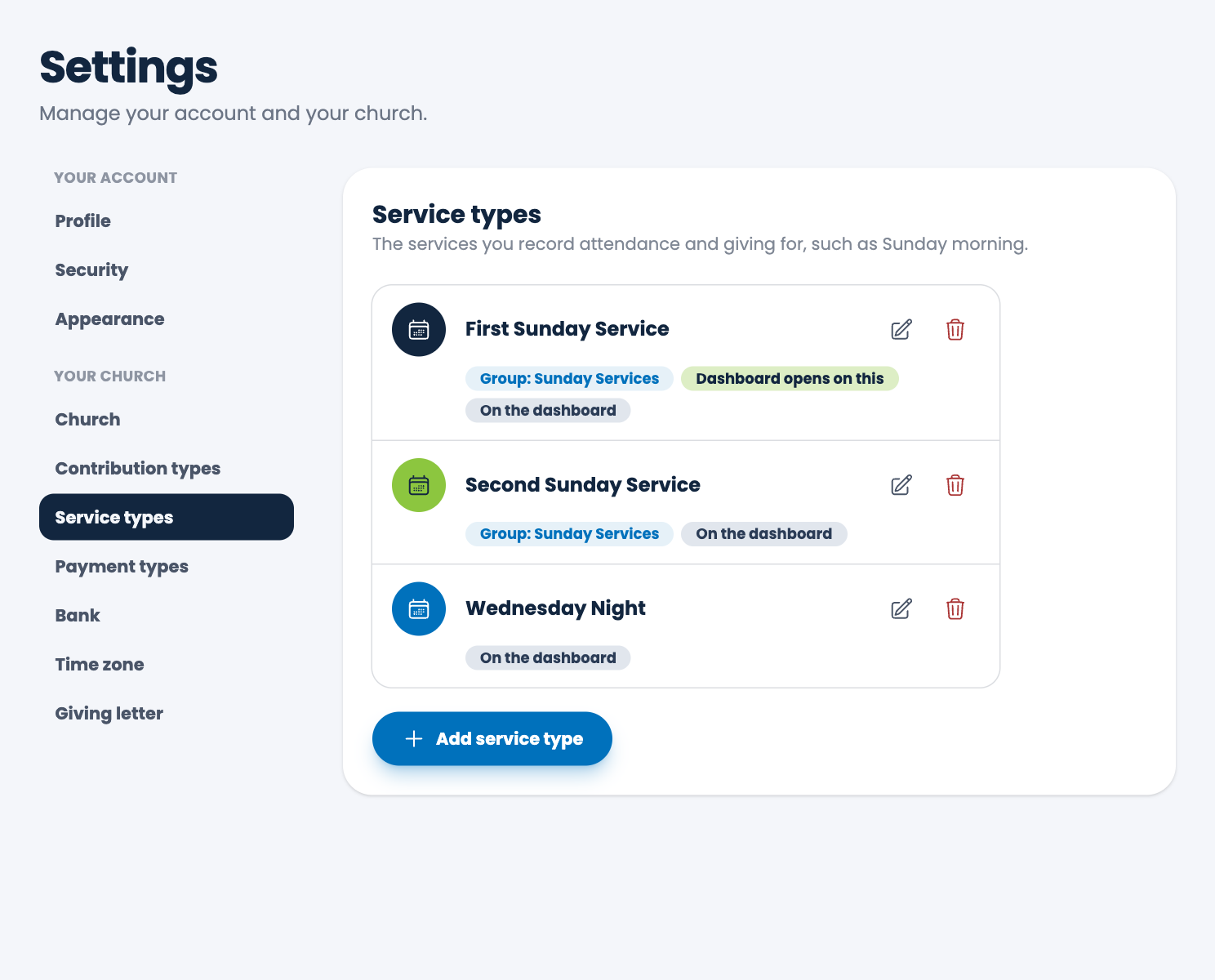
Dashboard choices
- Dashboard group (optional): services with the same group name are one service on the dashboard, and their counts on a day are added together. Use it for a Sunday that has more than one service. The group is also used in some reports: you can choose Service group under Group by in the Contributions report and the Attendance report, the Summary report shows each group with its services listed under it, and the Deposit slip lets you pick a whole group.
- Show on the dashboard: turn it off to leave the service out of the dashboard's attendance. Your records and reports aren't affected.
- Open the dashboard's attendance on this service: the service (or its whole group) the dashboard shows first. A service that's left off the dashboard can't be the one it opens on.
Change or remove one
Choose the pencil to edit, or the trash can to delete. A service that records already use can't be deleted. You must keep at least one.
Spotted a mistake, or something that is not clear? Tell us.