Trends
Giving and attendance month by month, and how to read the charts.
Note. If you're in Member care, Trends shows attendance only. The giving chart and the giving figures are left out. See Roles and what they can do.
Under the cards, Trends shows how giving and attendance have changed over the last 12 months or the last 6.
Choosing what you see
- 12 months or 6 months changes how far back both charts go.
- Limit attendance to one service appears if your church has more than one service. Choose All services, or pick one service (or a group of services that you've set up to count as one, such as two Sunday services). It changes the attendance figures, and the average at the top of the dashboard.
Tip. If you hold more than one service on a day, such as two Sunday services, you can group them so they count as one service here. Give them the same Dashboard group name. See Service types.
Giving by month
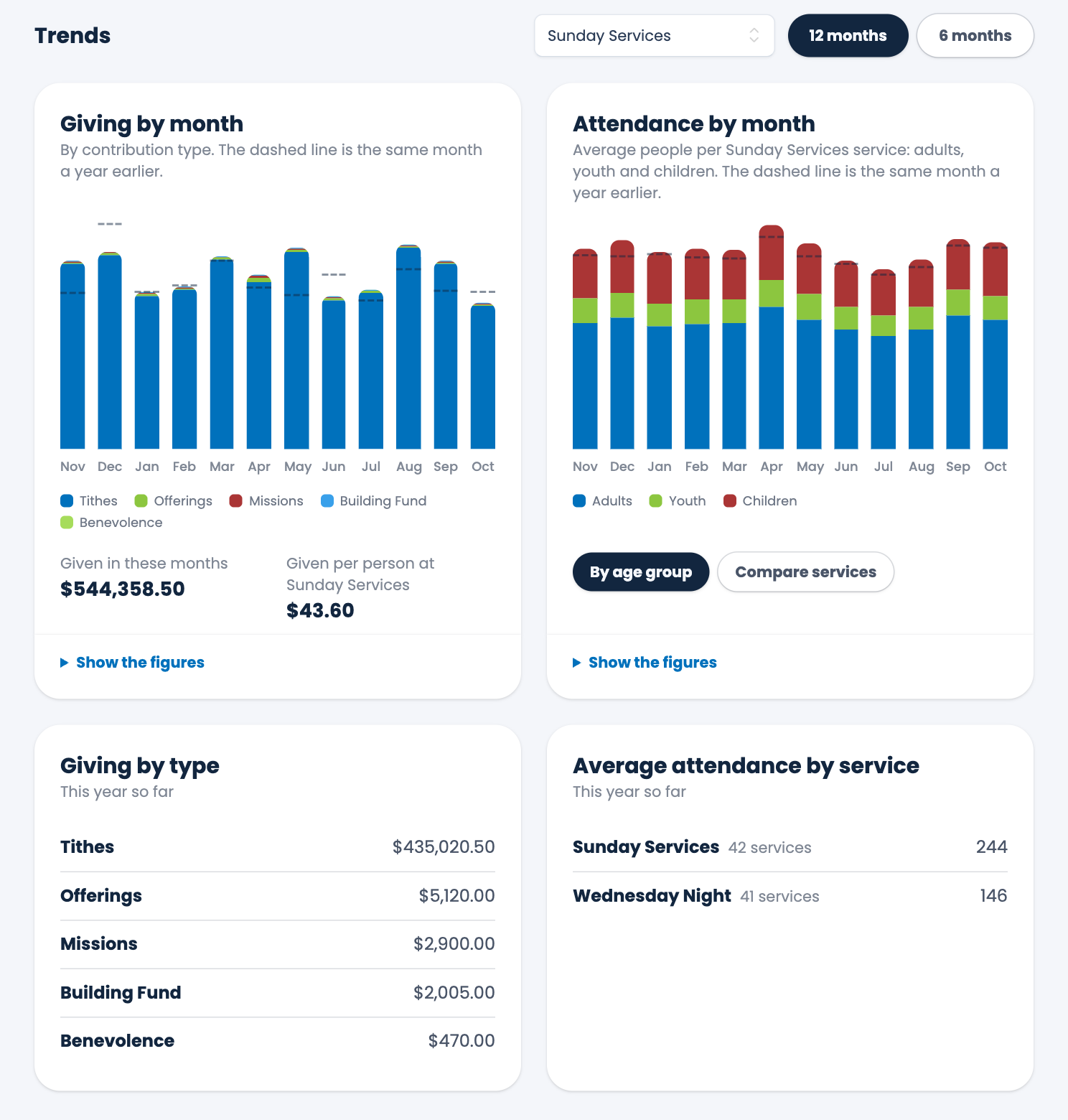
Each bar is one month's giving, split by contribution type, so you can see tithes, offerings and the rest. If your church has more than seven types, the seven largest are drawn separately and the rest are grouped together as Other. The dashed line across a bar shows how much was given in the same month a year earlier.
Hover over a bar (or tap it on a phone) to see that month's total, the number of gifts, a line for each type, and the same month last year.
Under the chart:
- Given in these months is the total for the months shown.
- Given per person at services is that total divided by the number of people counted at services in the same months. If you've limited attendance to one service, it's what was given at that service divided by the people counted at it.
Choose Show the figures to open a table with every month's Gifts, Total and Average gift.
Attendance by month
By default each bar is the average number of people at a service that month, split into Adults, Youth and Children. The dashed line again shows the same month a year earlier.
Choose Compare services to see each service as its own bar, side by side, with every service shown whichever one you picked above. Choose By age group to go back.
Giving by type and attendance by service
Two lists below the charts cover this year so far:
- Giving by type shows what each contribution type has brought in since January 1.
- Average attendance by service shows each service's average and how many times it was counted.
Note. Averages only count the services you actually counted. A month with no count shows as empty, and hovering over it says "no attendance recorded", so a gap in your counting doesn't pull the average down.
Spotted a mistake, or something that is not clear? Tell us.